risedigital-consulting.com

Project Management

Risk Assessment in Agile & Hybrid Projects:
Find It, Track It, Mitigate It

Every project carries risk. The PMs who succeed aren't the ones who avoid risk โ€” they're the ones who see it coming and act first. Here's how to build a risk-resilient project with Agile, hybrid methods, and AI as your secret weapon.

โœ Karine Or ๐Ÿ• 8 min read ๐Ÿ“‚ Project Management ยท AI ยท Agile

70% of projects face significant unplanned risks
2ร— more likely to succeed with regular risk reviews
40% reduction in risk impact when AI tools are used
Sprint cadence = the ideal risk reassessment cycle

Why Risk Management Is Different in Agile and Hybrid Projects

Traditional project management treated risk assessment as a one-time gate at the start of a project โ€” a risk register created during initiation, reviewed at milestone checkpoints, and largely forgotten in between.

In Agile and hybrid environments, that model simply doesn’t work. Requirements evolve. Priorities shift. New stakeholders arrive. Technologies change. A risk that didn’t exist in Sprint 1 can become project-critical by Sprint 5.

The good news? Agile’s iterative rhythm is perfectly designed for continuous risk management โ€” if you use it intentionally.

The Three Failures That Sink Projects

  • Risk blindness โ€” Identifying risks once at kickoff, then never revisiting them as the project evolves
  • No ownership โ€” A risk register exists but no one is accountable for monitoring or acting on it
  • Reactive response โ€” Waiting until a risk becomes a crisis before addressing it, costing time and budget

The Agile Risk Assessment Framework: 4 Steps Every Sprint

Risk management in Agile is a rhythm, not an event. Built into your sprint cadence, it takes less than 30 minutes per cycle and saves exponentially more in firefighting later.

01
Identify
At the start of each sprint, run a 10-minute risk scan. Ask: What could go wrong this sprint? What dependencies are fragile? What assumptions haven't been validated?
02
Assess
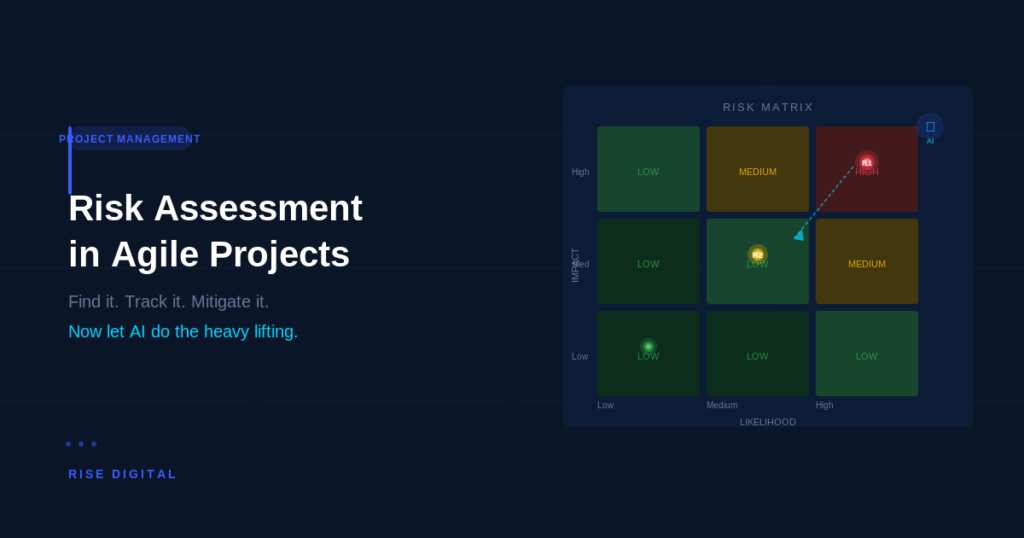
Score each risk on two axes: Probability (how likely?) and Impact (how damaging?). Use a simple 1โ€“5 scale. High ร— High = act now.
03
Own
Every risk gets a named owner โ€” not "the team." One person is responsible for monitoring it and triggering escalation if the risk materializes.
04
Mitigate
Define a mitigation plan before the risk becomes an issue. Reduce probability (preventive action), reduce impact (contingency plan), or accept it with eyes open.

How Often Should You Reassess?

The answer depends on your project velocity and risk environment:

  • Every sprint โ€” Minimum for Agile projects. Use the retrospective to surface new risks that emerged during the sprint.
  • Every 2 weeks โ€” Good cadence for hybrid projects where some workstreams are waterfall.
  • After every major decision or change โ€” Scope changes, stakeholder shifts, technology pivots. Any major change triggers an unscheduled risk review.
  • Monthly for the full register โ€” Revisit every open risk to reprioritize. Risks that were low last month may be high today.
โœฆ AI-Powered Risk Management

How AI Becomes the PM's Best Friend for Risk Assessment

Artificial intelligence doesn’t replace the PM’s judgment โ€” it amplifies it. Where human PMs can track a handful of risks consciously, AI tools can monitor hundreds of signals simultaneously, surface patterns invisibly, and flag issues before they escalate.

Here’s how AI changes the risk management game:

๐Ÿ”
Early Warning Detection
AI monitors velocity trends, blocker frequency, and communication patterns to detect project health issues weeks before they become visible to the team.
Tools: Linear AI, Jira Predictive Analytics, Notion AI
๐Ÿ“Š
Probability Scoring at Scale
Instead of manually estimating risk probabilities, AI analyzes historical project data to give statistically grounded probability scores โ€” dramatically improving accuracy.
Tools: Microsoft Copilot for Project, Planview
๐Ÿค–
Automated Risk Logging
AI can extract risks from meeting notes, emails, and standup summaries, automatically populating your risk register with items the team mentioned but didn't formally log.
Tools: Otter.ai + GPT, Fireflies.ai
๐Ÿ’ก
Mitigation Recommendations
Based on your risk type and industry, AI suggests proven mitigation strategies โ€” drawing from thousands of past projects to recommend what actually works.
Tools: Claude, ChatGPT, Gemini in Workspace
๐Ÿ“…
Schedule & Budget Risk Simulation
Monte Carlo simulations powered by AI model thousands of "what-if" scenarios to give you a realistic probability distribution for your project's completion date and final cost.
Tools: Oracle Primavera, Wrike
๐Ÿ”—
Dependency Risk Mapping
In hybrid projects with complex workstream dependencies, AI maps the full dependency tree and flags which dependencies are most fragile โ€” before they break.
Tools: Smartsheet AI, Monday.com AI

The PM who knows how to work with AI is not replaced by it โ€” they become a multiplied force. Less time chasing status updates. More time making strategic decisions. That’s the future of project management, and it’s already here.

5 Practical Risk Management Habits for Every PM

Theory is only valuable if it changes behavior. Here are five habits I embed in every project I manage โ€” they’re simple, fast, and they work:

  1. Start every sprint planning with a 3-question risk check
    Ask: "What could block this sprint?" "What assumptions are we making?" "What changed since last sprint?" Three questions, five minutes, huge impact.
  2. Assign a risk owner โ€” not a team
    When everyone owns a risk, no one owns it. Every risk in your register has one name next to it. That person monitors, escalates, and drives mitigation.
  3. Build your contingency buffer before you need it
    Standard practice: reserve 10โ€“15% of budget and 10โ€“20% of schedule for risk contingency. Never spend it on scope creep. It's your risk insurance policy.
  4. Use a living risk register, not a static document
    Your risk register lives in your project management tool, updated at every sprint. It's not a Word doc that was last touched in month one. If it's not current, it's not useful.
  5. Celebrate risks that were caught โ€” not just ones that were avoided
    Culture matters. When a team member surfaces a risk that saves the project, acknowledge it. Build a team that's proactively risk-aware, not one that hides problems until they explode.

Frequently Asked Questions

What's the difference between a risk and an issue in project management?
A risk is a potential future event that might impact the project โ€” it hasn't happened yet. An issue is a risk that has materialized and is actively impacting the project now. Good risk management prevents risks from becoming issues. When they do become issues, you need an issue log โ€” and a contingency plan you hopefully prepared in advance.
How do you manage risk in hybrid projects with both Agile and waterfall workstreams?
Hybrid projects require a two-layer risk approach. Agile workstreams use sprint-based risk reviews (every 1โ€“2 weeks). Waterfall workstreams use phase-gate reviews. The PM bridges both, maintaining a unified risk register that captures risks from both tracks and escalating cross-stream dependencies as high-priority items.
What AI tools are most useful for project risk management?
For most teams, the best starting point is AI built into your existing tools: Jira's predictive analytics, Monday.com AI, or Microsoft Copilot in Project. For smaller teams, using Claude or ChatGPT to analyze meeting notes and generate risk assessments is highly effective. More advanced options include Planview or Oracle Primavera for Monte Carlo simulations.
How many risks should be in a risk register?
There's no magic number, but as a guide: a typical project (3โ€“6 months, 5โ€“10 person team) should have 10โ€“25 active risks in the register at any time. More than 50 usually means risks are being logged too granularly. The register should contain meaningful risks โ€” not every conceivable event, but the ones that could actually change project outcomes.
Should risk assessment be part of sprint retrospectives?
Absolutely โ€” the retrospective is ideal for risk review because the team is reflecting on what happened. Add one risk question to your retro template: "What new risks emerged this sprint?" This keeps the register current with minimal additional ceremony, embedding risk awareness into your natural Agile rhythm.

Ready to de-risk your next project?

Your project deserves a PM who sees what's coming

I bring structured risk management, Agile expertise, and AI-powered insights to every project I lead โ€” so your team ships with confidence, not crossed fingers.

No commitment required. Just a conversation about your goals.